
Freelancers, consultants and small agencies
Turn a client brief into a project plan
A client brief tells you what the client wants. It rarely tells you every action needed to deliver it. Strumap helps freelancers, consultants and agencies move from that document to a working folder of tasks, priorities, deadlines and time estimates. Use the generated plan to review the scope, spot questions and decide what to work on first.
Start planning free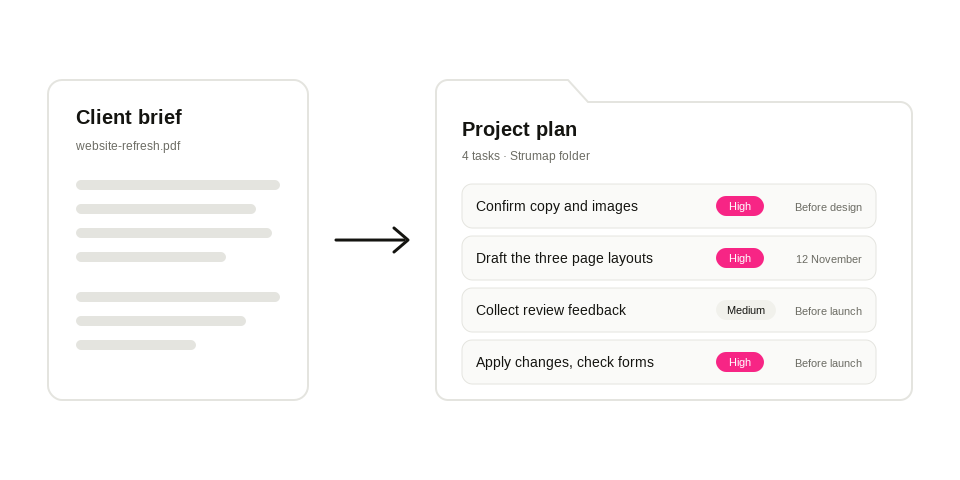
How it works
- 01
Add the source material
Upload a text-based PDF up to 2 MB, or describe the work in the composer. Include the deliverables and constraints from your source rather than relying on the AI to guess what is missing.
- 02
Review the generated folder
Check the task breakdown against the original document. Edit names, priorities, deadlines and effort estimates. Confirm uncertain details before treating the output as an agreed plan.
- 03
Work from the verified plan
Track task statuses, filter the folder and inspect dated tasks on the calendar. Update the plan when requirements change, and share it only with the people who need access.
A worked example
Illustrative example only. Tasks, dates and estimates below are a sample planning draft, not a customer result or guaranteed AI output.
Example brief: Refresh our three-page website: Home, Services and Contact. Keep the existing logo. Send a first draft by 12 November and launch by 20 November. We will supply approved copy and images. Include one review round.
Example resulting tasks
| Task | Priority | Timing | Estimated effort |
|---|---|---|---|
| Confirm copy, images and page requirements | High | Before design | 30 min |
| Draft the three page layouts | High | 12 November | 4 hours |
| Collect the agreed review feedback | Medium | Before launch | 45 min |
| Apply approved changes and check forms | High | Before launch | 2 hours |
| Publish the approved website | High | 20 November | 45 min |
What a project plan from a client brief should include
A usable plan covers more than a task list. Here is which parts Strumap drafts for you and which parts you still own.
| Part of the plan | Where it comes from |
|---|---|
| Deliverables and tasks | Generated by Strumap from the brief, then reviewed by you |
| Priorities | Generated by Strumap, editable |
| Deadlines and milestones | Taken from the brief where stated; editable |
| Time estimates | Suggested by Strumap as a planning draft, not a quote |
| Scope exclusions and open questions | Added by you after reading the brief |
| Owners and responsibilities | Confirmed by you with your team or client |
| Budget, risks and success measures | Defined by you outside Strumap |
| Client approval | Confirmed with the client outside the tool |
AI-generated deadlines and estimates are suggestions to review, not commitments to your client.
Strumap vs. general project management tools
General project management tools (for example ClickUp, Asana or Notion) are built to manage and track projects, and many now include AI features. Strumap starts one step earlier: from the brief or PDF itself, and turns it into a first, editable plan you review.
| If you need to… | A good fit |
|---|---|
| Turn a brief or PDF into a first task plan quickly | Strumap |
| Manage many ongoing projects, teams and workflows | A general project management tool |
| Do both | Start the plan in Strumap, then keep managing work in the tool your team already uses |
Read the brief for decisions, not just requests
Before you generate a project plan from a brief, separate the stated outcome from the constraints around it. A request for a website refresh is not the same as a request for a new brand, copywriting and development. Include the actual deliverables, review rounds, milestones and supplied materials in your source document. When the brief says “make it modern,” that is a question to clarify rather than a measurable acceptance criterion. Keep these uncertainties visible so the task plan does not quietly become a larger promise than the client made.
Turn scope into actions you can review
The useful output is a list of concrete verbs: confirm, draft, review, revise and publish. Strumap reads the brief and builds those actions into a folder. Each task can carry a priority, due date and effort estimate. Inspect the result against the source: is every requested deliverable represented, and has the AI introduced work that was never requested? Edit or remove anything that does not belong. The folder is a planning draft, not an automatically approved statement of work or a contract with your client.
Keep time estimates separate from your quote
An effort estimate helps you see the shape of the work, but it is not a guaranteed completion time or a fee recommendation. A design draft could require more exploration than the brief suggests; a simple contact form may depend on information you do not yet have. Review the estimate for each task using your own experience, then account separately for meetings, administration, contingency and client waiting time. Do not quote a project by simply treating every AI-generated minute as a billable commitment.
Make dependencies visible before committing dates
A launch date is only credible if the required inputs arrive in time. In the example, approved copy and images are client-supplied dependencies. Confirm who will provide them and when before accepting the draft deadline. You can edit task descriptions and dates to record that context, then use the calendar to inspect the week. If a source document has no deadline, add an agreed date yourself rather than treating a suggested schedule as a client commitment. Keep the original brief nearby for comparison.
Use the folder when the brief changes
A plan is useful after the first draft, too. Track progress through task statuses and update priorities when a requirement changes. If the client adds another page, record that as new work and revisit the time estimate instead of burying it inside an existing task. Invite collaborators by email when they need to edit the folder, or use a view-only share link for people who only need to read it. Confirm changes with the client outside the tool; sharing a folder is not formal approval.
Who it’s for
Freelancers, consultants and small agencies. This workflow fits people who already have a written source and want to review an actionable planning draft before doing the work. It does not replace checking requirements with a client, instructor or team.
Client brief to project plan FAQ
Why not just use ChatGPT to turn a brief into a plan?
A chat assistant gives you a plan as text that you then copy into another tool. Strumap creates a folder of editable tasks with priorities, deadlines and time estimates, which you can track by status, view on a calendar and share with collaborators. Either way, review the plan against the original brief.
Can I create a project plan from a short brief?
Yes. A short brief can be a starting point if it names the outcome and constraints. Include deliverables, dates and known exclusions where possible, then review the generated tasks for gaps before committing to the scope.
Does Strumap write a statement of work?
Strumap generates an editable task plan, not a legally reviewed statement of work. Use the tasks to inform your scoping conversation and prepare any contractual documents separately.
Can I change deadlines and effort estimates?
Yes. You can edit the generated tasks, priorities, due dates and estimates. Check them against the brief and your experience, especially before promising a delivery date or price.
Can my collaborators work on the plan?
You can invite collaborators by email to edit a folder together. A view-only sharing link is also available when someone needs visibility without editing the tasks.
What should I upload during beta?
Use a text-based PDF up to 2 MB or describe the work in the composer. Avoid highly sensitive, regulated or confidential client material during the early beta.
Keep exploring
Start with your next document
Free during beta. Review your generated folder before relying on its tasks, dates or estimates.
Create your task plan